Organization Settings
Configure your workspace — general info, branding, privacy, security, localization, and the danger zone
Last updated
The Settings area is where owners and admins configure the organization. It's split into focused sections.
General
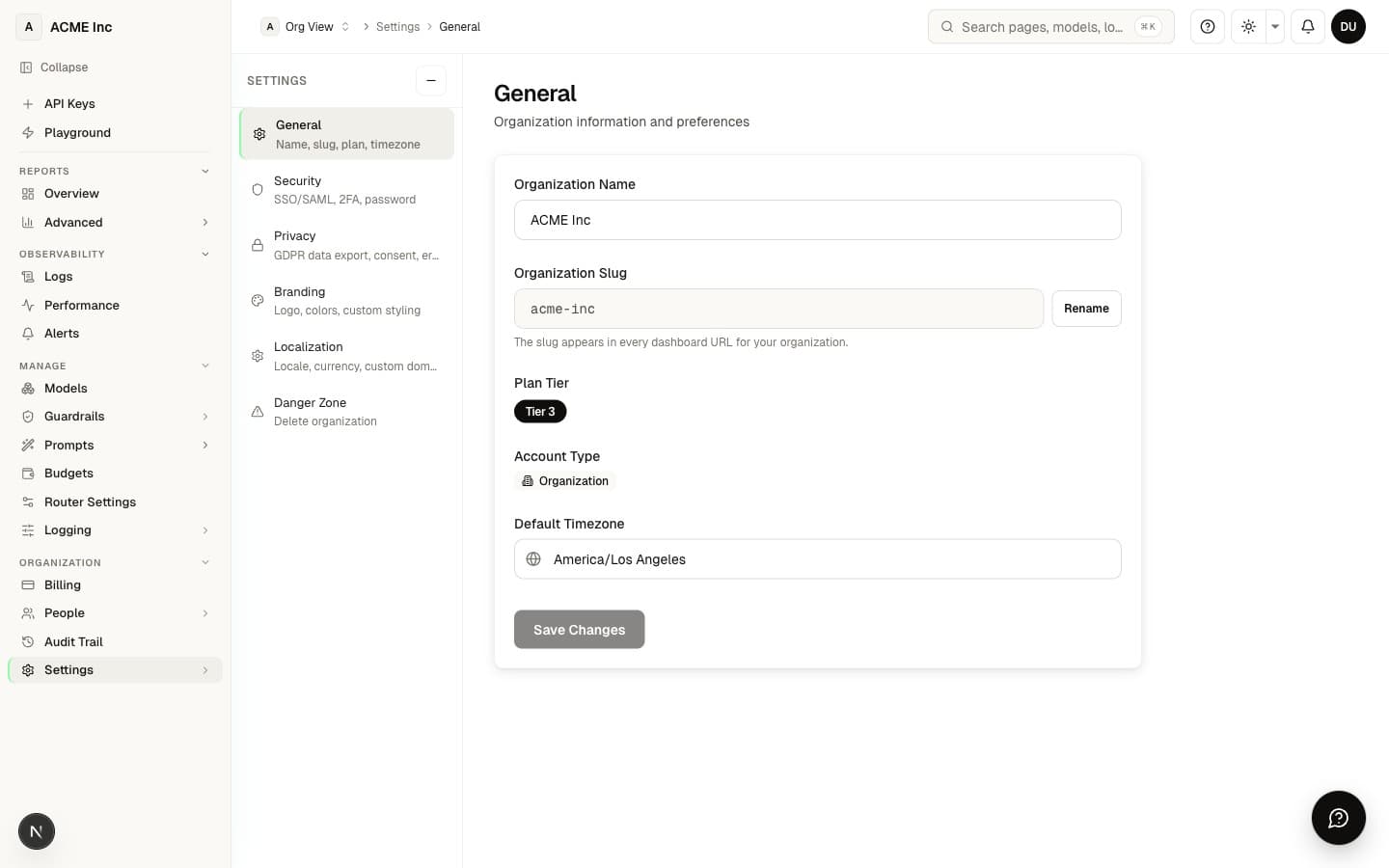
/settings — the basics:
- Organization name and slug (your dashboard URL; renaming the slug is a confirmed, one-way action)
- Timezone (preset list across US, EU, Asia, and Pacific)
- Your plan tier label and account type (Individual or Organization, which is convertible)
- A shortcut to billing & features
Branding
/settings/branding — make the dashboard yours:
- Upload a logo (drag-and-drop or file picker) with live preview
- Pick a primary brand color from a WCAG-safe palette or enter a custom hex (theming of branded surfaces is coming soon — the dashboard keeps its neutral theme today)
Privacy & data policy
/settings/privacy — GDPR-aligned controls:
- Data access — download a JSON export of your personal data (GDPR Art. 15/20)
- Consent records — Privacy Policy, Terms of Service, Marketing, and Data Processing, each with version and timestamp
- Erasure — request deletion of your organization data (owner-only, GDPR Art. 17)
Note: logging level is configured under Data Policy (Manage → Logging), and PII redaction is a Localization control that is not yet enforced (see below).
Security
/settings/security — protect access:
- Reset password
- Two-factor authentication (TOTP authenticator app) — enroll, name, and remove your own factors. See Two-Factor Authentication
- SSO configuration and SCIM tokens for enterprise provisioning
- Active sessions review
Organization-wide require 2FA enforcement is configured on the Team Management (Members) page, not here — this section covers your own account security.
Localization
/settings/localization:
- Locale (BCP 47) — 12 presets, saved as a display preference
- Currency (ISO 4217) — 8 presets with symbols
- Favicon upload (coming soon — activates with custom-domain serving)
- Custom-domain CNAME instructions (coming soon — domain routing is in development)
- Log retention and PII redaction privacy controls (coming soon — not yet enforced; logs are retained 90 days today)
Danger zone
/settings/danger-zone:
- Delete organization — irreversible. The org must have a single member (empty your team first), and you confirm by typing the org slug. After deletion you're returned to the sign-in page.
Most settings require owner or admin permission. Members and viewers see a read-only view.
Next steps
- Two-Factor Authentication — Set up MFA from Security
- Team Management — Invite members and assign roles
- Audit Log — Settings changes are recorded here
FAQ
Who is allowed to change organization settings?
Most settings require owner or admin permission. Members and viewers get a read-only view, so they can see how the workspace is configured but can't modify the name, branding, security, or other org-level controls.
What happens when I rename my organization slug?
The slug is your dashboard URL, so renaming it is a confirmed, one-way action — once changed, the old URL no longer points to your workspace. Update any bookmarks or saved links after you rename it.
Can I put my own logo and brand color on the dashboard?
You can upload a logo (drag-and-drop or file picker) with a live preview on Branding, and choose a primary brand color from a WCAG-safe palette or a custom hex. Theming the dashboard with your brand color is coming soon — today the dashboard keeps its neutral theme.
How do I download a copy of my personal data?
The Privacy & data policy section gives you a JSON export of your personal data, aligned with GDPR Article 15/20. The same section also shows your consent records — Privacy Policy, Terms of Service, Marketing, and Data Processing — each with its version and timestamp.
What controls how much request data is logged?
The logging level (zero / metadata / full / PII-redacted) is set under Data Policy (Manage → Logging) and is what Observability honors. Today only request metadata (model, tokens, cost, latency) is logged — request/response content is never stored (a privacy-safe default), and Full Logging (capturing that content for debugging) is coming soon. A separate PII redaction privacy control lives under Localization but is not yet enforced (coming soon). Logs are currently retained for 90 days.
Can I require two-factor authentication for everyone in my organization?
Yes — organization-wide "require 2FA" enforcement is turned on from the Team Management (Members) page, and each person enrolls a TOTP authenticator app (see Two-Factor Authentication). The Settings → Security section covers your own account: password reset, active-session review, and managing your individual authenticator factors.
Does NemoRouter support SSO and SCIM for enterprise provisioning?
Yes — the Security section includes SSO configuration and SCIM tokens for provisioning users at scale. These sit alongside 2FA and session controls as part of your access-protection setup.
Can I change the currency and locale, and does that affect what I'm billed?
You can set your locale (BCP 47, 12 presets) and currency (ISO 4217, 8 presets with symbols) under Localization, which controls how values are formatted and displayed. This is a display preference — it does not change the currency your account is actually charged in.
How do I delete my organization, and can I undo it?
Deleting an organization is irreversible. It's only allowed when the org has a single member — so empty your team first — and you confirm by typing the org slug, which the system verifies before proceeding; afterward you're returned to the sign-in page.
Are changes I make in Settings recorded anywhere?
Yes. Settings changes are captured in your Audit Log, so owners and admins can review who changed what and when.