

API Consumers (the `user` field)
How NemoRouter identifies the downstream consumers behind your API key, what to put in the OpenAI-spec `user` field, how to tag and set per-consumer limits, and the five step-by-step workflows you will use most.
Last updated
The API Consumers page (/[organization]/advanced/api-consumers in the dashboard) shows the downstream entities behind your traffic — the actual people, tenants, or projects your application serves. Consumers are not invited or created up front; they appear automatically the first time you pass a user field on a request.
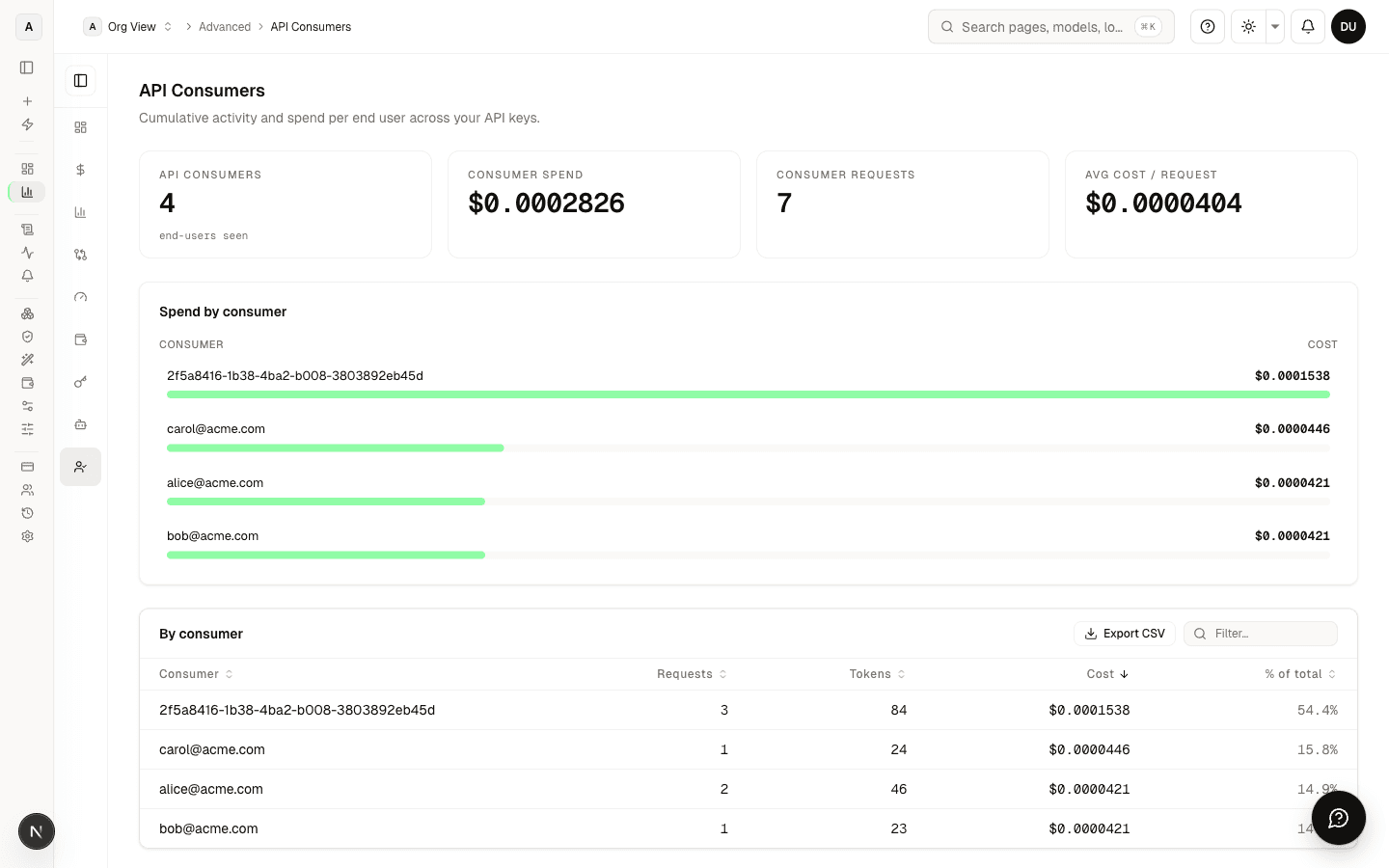
This guide answers three questions and walks five workflows end to end:
- Why is the page empty even though I have traffic?
- What should I actually put in the
userfield? - How do I tag, limit, and budget individual consumers?
How a consumer is identified
Every chat / completion / embedding request can carry a top-level user field (the OpenAI spec calls it "a unique identifier representing your end-user"). We record the exact string you send and aggregate by exact match. There is no mapping table on our side — we never join user against anything; it is treated as an opaque identifier.
curl -s https://api.nemorouter.ai/v1/chat/completions \
  -H "Authorization: Bearer sk-nemo-<your-key>" \
  -H "Content-Type: application/json" \
  -d '{
    "model": "gemini-2.5-flash",
    "messages": [{"role": "user", "content": "hello"}],
    "user": "u_8f3a1b9c"
  }'
The OpenAI Python SDK passes the field through automatically:
client.chat.completions.create(
    model="gemini-2.5-flash",
    messages=[{"role": "user", "content": "hello"}],
    user="u_8f3a1b9c",
)
After one call, u_8f3a1b9c appears as a row on the Consumers page with its tokens, requests, and spend.
Why the page can be empty
The page is empty when no traffic on your virtual keys has included a user field yet. Requests without a user value are recorded for billing but are not attributed to any consumer, so there is nothing to display on this page.
Quick check, in order:
- You have at least one virtual key on the org. Without keys, you cannot have traffic. The empty state on the page links you to
/keys. - Your requests include
"user": "..."in the body. Bare smoke tests andcurlcommands you copy from a tutorial typically omit it. - The string you send is not one we use internally. Identifiers we reserve for org-level cost accounting are excluded from the consumers view; any value that comes from your own ID generator will not collide.
- Your role is owner or admin. Members and viewers see only consumers attributed to keys they own — by design — so an empty page for a member can simply mean "you don't own a key with traffic yet". Switch the scope selector to Org-wide if you have the role for it.
To populate the page, either send a real request with a user field, or use Pre-register a consumer (Workflow 2 below) to create an entry before any traffic flows.
What to put in the user field
The value is free-form. The right choice depends on what you want to slice your traffic by.
| Pattern | Example value | When to use | Granularity |
|---|---|---|---|
| End-user ID | u_8f3a1b9c | B2C app — you want to see which of your users is spending | One row per user |
| Tenant / workspace | tenant_acme | B2B SaaS — you bill or quota your own customers | One row per tenant |
| Project / product | proj_chatbot | Multi-product company — attribute spend per product line | One row per product |
| Composite | tenant_acme:u_8f3a1b9c | You want a hierarchy and to filter on either level | Rows = tenants × users |
Recommendation: send an opaque, stable identifier — typically a hash or UUID from your own database. Do not send personally identifiable information (email addresses, full names, phone numbers). The OpenAI spec is explicit on this point and we agree: PII in the user field flows through to upstream provider logs and complicates GDPR data-subject requests later.
If you want friendly labels in the dashboard, add them as tags on the consumer row (see Workflow 3).
How it interacts with the rest of NemoRouter
You already have four levels of separation before you reach the user field:
Organization (acme-inc)
  └─ Team (e.g. "marketing", "research") — budgets and RPM/TPM per team
       └─ Virtual key (sk-nemo-…) — budgets, RPM/TPM, model allowlist per key
            └─ user (alice, proj_chatbot, tenant_acme, …) — appears on /advanced/api-consumers
This matters for design. Common mistakes:
- Don't model projects as
uservalues if they need different budgets or rate limits. Use a separate virtual key (or a separate team) per project. Keys are the right place for hard caps because they are enforced before the request leaves the gateway. - Don't model tenants as
userif you need to revoke their access. Revocation lives on the key, not on theuserfield — there is no "block user X" knob today. - Do use
userwhen you want analytics granularity without separate keys. A single virtual key shared across all of a tenant's seats, withuser: "<seat_id>"per request, gives you per-seat visibility without the operational cost of one key per seat.
A clean shape for a multi-tenant SaaS:
acme-inc org
 └─ Team: production
      └─ Key: sk-nemo-prod   ← rotated on a schedule, scoped to allowed models
           └─ user: tenant_acme:user_8f3a   ← composite; tags add display labels
Step-by-step workflows
Workflow 1 — Send your first user field from an existing app
You already have a working API key and your app is calling NemoRouter. You just need to start passing user.
- Pick the identifier shape (table above). For most teams this is the user's primary-key UUID or a hash of it.
- Locate the place in your code that builds the request body. With the OpenAI SDK, the field is a first-class kwarg — you do not need to add it to
messagesorextra_body. - Add
user="<opaque_id>"to every call. If you only add it to some, those calls will be unattributed and will not appear on the Consumers page. - Deploy, send a single real request, and reload the Consumers page. The new row appears within ~3 seconds (logs are written asynchronously).
from openai import OpenAI
client = OpenAI(api_key=os.environ["NEMOROUTER_API_KEY"], base_url="https://api.nemorouter.ai/v1")

def call_model(prompt: str, end_user_id: str):
    return client.chat.completions.create(
        model="gemini-2.5-flash",
        messages=[{"role": "user", "content": prompt}],
        user=end_user_id,   # ← this is the only line you need to add
    )
// TypeScript / Node — same field at the top level.
const completion = await client.chat.completions.create({
model: 'gemini-2.5-flash',
messages: [{ role: 'user', content: prompt }],
user: endUserId,
});Workflow 2 — Pre-register a consumer before traffic flows
Useful when you want to attach a budget or rate limit before the consumer's first call (e.g. you are onboarding a paying tenant on a quota plan). Pre-registration is done through the API:
# Pre-register a consumer with caps, before any traffic flows
curl -X POST https://nemorouter.ai/api/end-users/create \
  -H "Content-Type: application/json" \
  -H "Cookie: <your-session-cookie>" \
  -d '{
    "organization_id": "<your-org-uuid>",
    "end_user_id": "tenant_acme",
    "alias": "Acme (paid)",
    "max_budget": 50,
    "rpm_limit": 60,
    "tpm_limit": 100000
  }'
The end_user_id must match character-for-character what your app sends in the user field — tenant_acme and tenant-acme are different consumers. The consumer is created with 0 spend / 0 requests; the first real call from your app picks up the budget and limits. Owner or admin only (viewers get 403).
Bulk variant: POST /api/end-users/bulk accepts a batch of consumers in one call — useful when migrating from a previous system.
Workflow 3 — Add tags to organize consumers
Tags are free-form labels (tenant:acme, plan:pro, region:eu). They are stored locally in NemoRouter and survive cleanly across LLM provider rotations. Manage them through the API (any non-viewer member of the org):
# Add a tag
curl -X POST https://nemorouter.ai/api/end-users/tags \
  -H "Content-Type: application/json" \
  -H "Cookie: <your-session-cookie>" \
  -d '{
    "organization_id": "<your-org-uuid>",
    "end_user_id": "tenant_acme",
    "tag": "plan:pro"
  }'

# List tags for an org (optionally scoped to one end-user)
curl 'https://nemorouter.ai/api/end-users/tags?organization_id=<uuid>&end_user_id=tenant_acme' \
  -H "Cookie: <your-session-cookie>"

# Remove a tag by id
curl -X DELETE 'https://nemorouter.ai/api/end-users/tags?id=<tag-uuid>&organization_id=<uuid>' \
  -H "Cookie: <your-session-cookie>"
The tag is idempotent: posting plan:pro twice for the same consumer creates only one chip (uniqueness is (organization_id, end_user_id, tag)).
Naming conventions that scale. Tags are not validated — anything goes — but a key:value convention keeps the column readable as it grows:
| Dimension | Example tags |
|---|---|
| Plan tier | plan:free, plan:pro, plan:enterprise |
| Region | region:us, region:eu, region:apac |
| Lifecycle | trial, onboarding, churned |
| Team owner | owner:growth, owner:research |
| Cost-center | cc:1234, cc:5678 |
Tags affect display and filtering only — they do not gate access, change budgets, or alter routing. To enforce per-consumer limits use overrides (Workflow 4).
Workflow 4 — Set per-consumer RPM / TPM / budget overrides
Hard caps that are enforced at request time, on top of whatever the key already enforces. Useful for capping a noisy tenant without blocking the whole key.
From the UI (owner or admin only):
- On the Consumers page, find the row and click the gauge icon in the Limits column.
- Enter the RPM cap (requests per minute), TPM cap (tokens per minute), or leave blank to remove a limit.
- To set a budget cap, use Pre-register a consumer with the user's existing ID — the form is the same and will update the existing row.
From the API (owner or admin only):
curl -X PUT https://nemorouter.ai/api/end-users/overrides \
  -H "Content-Type: application/json" \
  -H "Cookie: <your-session-cookie>" \
  -d '{
    "organization_id": "<your-org-uuid>",
    "end_user_id": "tenant_acme",
    "rpm_limit": 60,
    "tpm_limit": 100000,
    "max_budget": 25.00,
    "notes": "Pro plan — Q3 2026 contract"
  }'
What each cap does:
rpm_limit— requests per minute. The 61st request inside any sliding 60-second window returns 429. The reservation is released; you are not billed.tpm_limit— input + output tokens per minute. Same 429 behavior. Tokens are counted after the response settles, so a single large request can exceed the per-minute cap and the next request is the one that gets rejected.max_budget— cumulative USD spend. The first request that pushes the consumer over the cap returns 402. There is no auto-reset; raise the budget or wait for the consumer to be retired.notes— internal-only string (max 500 chars). Surfaced in audit logs and the override row tooltip.
Caps stack with the key's own caps — the tightest cap wins. A key with rpm_limit: 1000 and a consumer with rpm_limit: 60 means the consumer is capped at 60 even though the key allows 1000.
Workflow 5 — Search, filter, and audit your consumers
The page paginates at 25 rows. Past a few dozen consumers, you'll want the search and sort affordances:
- Search by user ID — the search box does a case-insensitive substring match against
end_user_id. Composite IDs liketenant_acme:user_8f3aare searchable on either half. - Sort — click any sortable column header (User ID, Total Spend, Total Tokens, Requests, Last Active). The arrow indicator shows direction; click again to reverse.
- Anomaly badges — the Anomaly chip on a row means that consumer's spend is more than 5× the cohort mean or their request volume is more than 3σ above the cohort mean. Cohorts smaller than three consumers are skipped (the statistic isn't meaningful at that size). Anomalies are advisory, not a billing event.
- Top end user card + bar chart — only render with ≥2 and ≥3 consumers respectively; a single-bar chart implies "100% share" misleadingly, so we suppress it.
Audit:
- Every tag add/remove is recorded in the org audit trail with the actor's user ID, the consumer ID, and the tag value.
- Every override change is recorded with before/after values and the actor.
- The audit log is queryable from
/[organization]/audit(owner or admin).
Reference
Identifying fields
| Field | Where | Purpose |
|---|---|---|
user (request body, top-level) | Every chat / completion / embedding request | Identifies the downstream consumer |
end_user_id | Dashboard column header, API payloads | Same value, used as the row key on the Consumers page |
tag | Per-consumer label ((org, end_user, tag) unique) | Free-form classification; display + filtering only |
Endpoints
The dashboard uses these endpoints; you can call them with a session cookie if you script against the app. Public, key-authenticated equivalents are not yet exposed — open a feature request if you need them.
| Method + path | Purpose | Role required |
|---|---|---|
GET /api/nemo-proxy/customers?type=list&orgId=<uuid> | List consumers with aggregates | Member |
GET /api/nemo-proxy/customers?type=activity&customer_id=<id>&start_date=<YYYY-MM-DD>&end_date=<YYYY-MM-DD>&orgId=<uuid> | Daily activity series for one consumer | Member |
POST /api/end-users/create | Pre-register one consumer | Admin / owner |
POST /api/end-users/bulk | Bulk-import consumers from CSV | Admin / owner |
GET /api/end-users/tags?organization_id=<uuid>[&end_user_id=<str>] | List tags | Member |
POST /api/end-users/tags | Add a tag | Member (not viewer) |
DELETE /api/end-users/tags?id=<uuid>&organization_id=<uuid> | Remove a tag | Member (not viewer) |
GET /api/end-users/overrides?organization_id=<uuid> | List per-consumer limits + budgets | Member |
PUT /api/end-users/overrides | Upsert per-consumer limits + budget | Admin / owner |
Constants
userfield max length: 200 characters.- Tag max length: 60 characters.
- Notes max length: 500 characters.
- Search is case-insensitive substring on
userID. - Page size: 25 consumers per page.
- Spend log retention: 90 days (rolling window — older calls drop off the page).
FAQ
Do I need a mapping table on my side? Optional. If your real customers are humans with names and emails, keep that mapping in your own database and send only the opaque ID to us. Join locally when you need to display a friendly name.
Can I rename a consumer? No — the user value is the identity. Once you have traffic under user_abc, future calls under user_xyz are a different consumer. Send a stable ID from the first call.
Does the field count against my budget? No. The user field is a free attribute; it does not change cost or routing.
Is the field forwarded to the model provider? Yes for OpenAI (it appears in their usage dashboard). Anthropic and Google Vertex AI receive equivalent metadata in their own formats. Send opaque IDs only.
What if I send no user value at all? The request succeeds and is billed normally. It simply does not appear on the Consumers page — there is no consumer to attribute it to.
Why is my consumer's spend zero in the chart but non-zero in the table? The chart shows current billing period; the table shows lifetime. A consumer with old traffic but no calls this month renders zero on the chart and accumulates on the table.
Can a tag block a request? No. Tags are labels only. Use overrides (RPM/TPM/budget) for hard caps. We do not gate on tag membership — that would couple display to enforcement, which is brittle.
Where to go next
- API Key Management — keys are the layer above consumers; rotate and scope them properly.
- Team Management — teams are the layer above keys; budgets and RPM/TPM live there too.
- Budget Controls — how to combine per-key, per-team, and per-consumer caps.