Creating an Account
Sign up for NemoRouter — what you provide, email confirmation, and your first credits
Last updated
Signing up for NemoRouter takes about a minute. You create a personal login, name your workspace (organization), and pick a plan. This page walks through every step and what to expect.
The three-step wizard
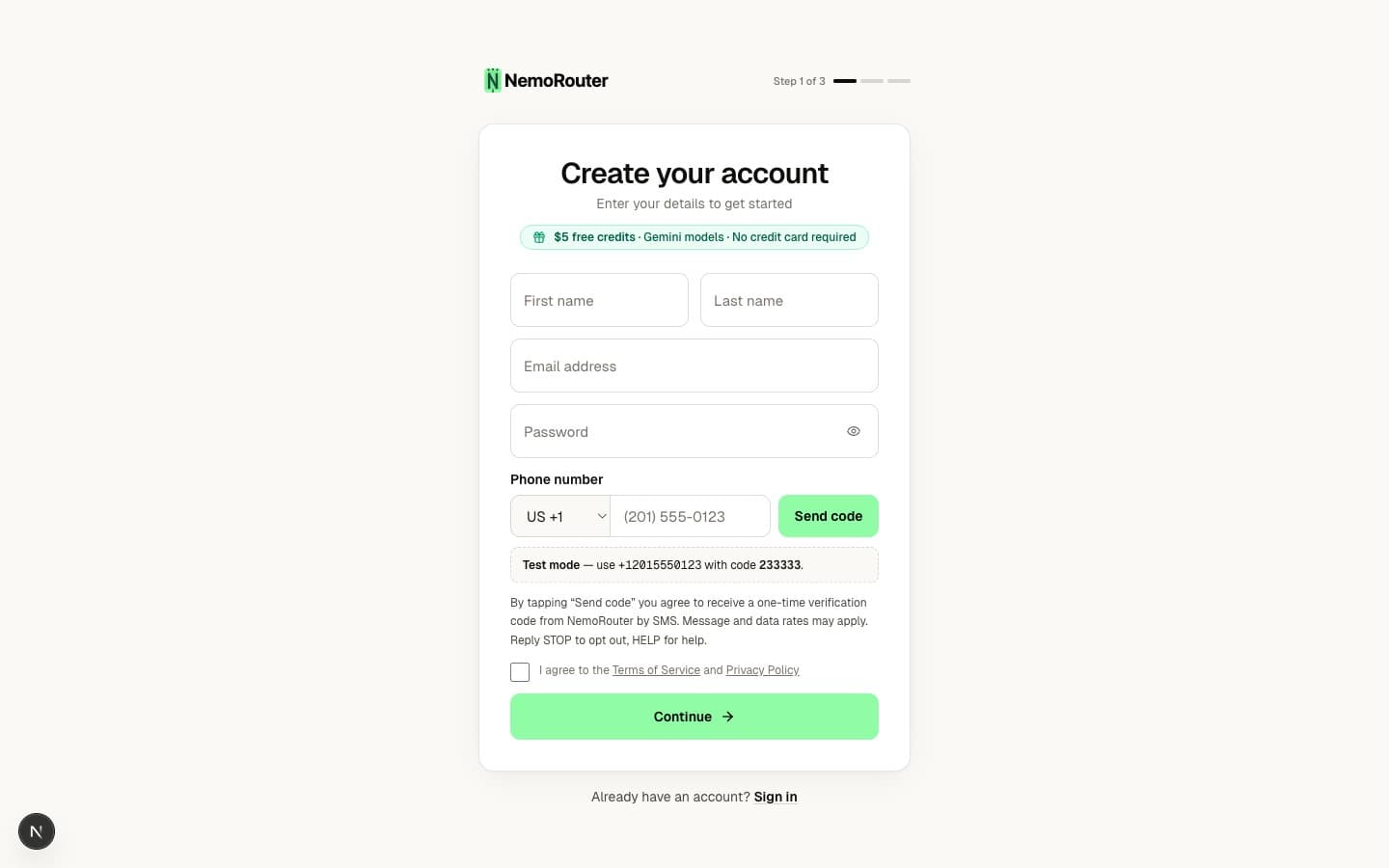
Sign-up at /signup is a short, three-step wizard:
| Step | What you enter |
|---|---|
| 1 — Your details | First name, last name, email, and a password. You also agree to the Terms of Service and Privacy Policy. |
| 2 — Your workspace | An organization name and a URL slug (auto-suggested from the name). This becomes your dashboard address — /{your-slug}. |
| 3 — Choose a plan | Pick a tier — Pay as you go, Pro, or Enterprise ("contact us"). Add a card on file to start. |
Every user belongs to exactly one organization. If you're joining a teammate's workspace instead of starting your own, use the invite link they send you — see Team Management.
Password requirements
Your password must be at least 8 characters — there are no forced uppercase/lowercase/digit rules, so a long passphrase works. This policy is enforced everywhere — sign-up, sign-in, and password reset. See Passwords & Reset for the full rules.
Email confirmation
After you finish the wizard, NemoRouter sends a verification link to your email. Click it to activate your account and start onboarding.
- The confirmation screen shows "Check your email" with the address we sent to.
- If you don't see it, use Resend verification email (limited to 3 times per hour).
- Entered the wrong address? Restart the wizard from the confirmation screen.
Some deployments have email confirmation turned off, in which case you're signed in immediately after step 3.
Phone verification (when your organization requires it)
If your deployment has phone verification enabled, step 1 also asks for a mobile number. You'll receive a one-time SMS code that must be verified before you can continue. This is off by default — see Phone Verification for the full flow.
Your first credits
NemoRouter is credit-based — you buy credits, and every LLM call settles against your balance. Add a card and load your first $5 — we match it with a $10 bonus, so you start with $15 for the full model catalog. When you're ready to add more, top up from $5 per transaction; the platform fee is charged on top of your purchase, never deducted.
See Budget Controls for how credits, budgets, and rate limits interact.
Rate limits & abuse protection
Sign-up is protected against abuse:
- A limited number of sign-up attempts per hour, per IP address and per email.
- A CAPTCHA may appear after repeated attempts.
- Email addresses are checked early (in step 1) so "already registered" is caught before you finish the wizard.
What you'll see if something's wrong
| Message | Meaning |
|---|---|
| "Email already registered" | An account already exists — try signing in or resetting your password. |
| "Password must be at least 8 characters" | Lengthen your password to meet the policy. |
| "You must agree to the Terms and Privacy Policy" | Tick the consent checkbox in step 1. |
Next steps
- Quick Start — Make your first API call
- Logging In — Sign-in methods, including magic link and SSO
- API Key Management — Create the virtual key your code uses
- Organization Setup — Configure your new workspace